New Microsoft Security Essentials ‘Bug’ Renders Windows XP PC’s Unusable!
By Ed Czelada, technology staff
www.Smile.FM
Published 4/17/2014 9:00AM EST
Many desktop and laptop users are still running Windows XP (approximately 28% of all PC’s) despite Microsoft's April 8 cutoff of support for the general public (large corporate support is still available). While the reasons are varied, incompatible software, old hardware, or if-it’s-not-broke-don’t-fix-it, there is one thing you should be aware of - Microsoft Security Essentials can you render your trusty old XP PC unusable!
The Problem: It seems sometime on April 16, 2014 Microsoft released an update to Microsoft Security Essentials, which causes your XP computer to hang! I personally experienced this problem when I took a tech support call Wednesday morning. They weren’t able to click on any icons.
The Stumper: It sounded like a virus had got to the PC…but that turned out NOT to be the case. So I booted to “Safe Mode with Networking Support” ran a quick virus scan using Hitman Pro www.surfright.nl and found nothing – I was stumped! In desperation, I started looking thought the Windows Event Log in the control panel; I could see the Microsoft Security Essentials was crashing. That was the clue I need to solve the mystery!
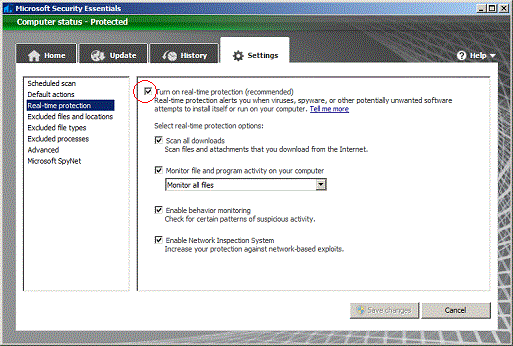
The Solution: In our case, we could get the computer to boot in the “Safe Mode” by repeatedly pressing F8 key after powering on the computer, then selecting “Safe Mode with Networking Support” with the up/down arrows and pressing Enter key. Once booted in “Safe Mode” I could then disable Microsoft Security Essentials, by going into the Start Menu, and clicking Microsoft Security Essentials. Once in the program I went to Settings tab and UNchecked “Run a scheduled scan”, then I went into “real-Time Protection” and UNchecked “Turn-on real-time protection” (see pictures below). We then rebooted normally and the computer runs as good as new!

Other Solutions: I guess I’m not the only one that encountered this problem - Tom’s Hardware has an article about this problem also, but with a different solution (albeit a bit harder to do): http://www.tomshardware.com/answers/id-2108032/windows-system-hangs-login-screen-security-essential.html